
Every time you open a web page, make a voice call or stream video, your device follows agreed rules to exchange data with systems worldwide. In Leaving Certificate Computer Science, you must distinguish between the physical infrastructure of the Internet and the software services of the World Wide Web. You also need to understand network types, the client-server and peer-to-peer architectures, the role of core networking hardware, and how key communication protocols—specifically HTTP, HTTPS, TCP, IP, and VoIP—interact across network layers to deliver data reliably and securely.
The Internet vs the World Wide Web
A frequent mistake in exam answers is treating the Internet and the World Wide Web as identical terms. They represent two distinct layers of technology.
- The Internet is the global physical and logical infrastructure. It is a vast network of interconnected networks made up of personal devices, servers, underground fibre-optic cables, undersea lines, wireless links, switches, and routers. Devices communicate across this infrastructure by following agreed rules called communication protocols, primarily the TCP/IP suite. If the Internet is the road network, the Web is one particular kind of traffic travelling on it — the delivery vans carrying web pages.
- The World Wide Web (WWW) is an application-level service running on top of the Internet. Invented by Tim Berners-Lee at CERN in 1989, the Web is an interconnected system of digital documents and multimedia resources hosted on web servers. These resources are connected by hyperlinks and identified by Uniform Resource Locators (URLs).
A web browser is client software that fetches web resources, interprets Hypertext Markup Language (HTML), CSS, and JavaScript, and renders the result onto your screen. Email, gaming networks, and voice calls also travel over the Internet, but they are not part of the Web because they do not rely on interlinked web pages viewed through a browser.
Consider this sample web address:
https://www.examinations.ie/schools/timetable.html
The URL breaks down into three key elements: the transfer protocol (https), the domain name identifying the host server (www.examinations.ie), and the directory path locating the file (/schools/timetable.html). Before a browser can send a request, the Domain Name System (DNS) must translate the human-readable domain name into a numeric IP address.
Network Architectures: Client-Server, Peer-to-Peer, and ALT 1
Distributed computing systems organise devices into two main architectures: client-server and peer-to-peer.
The Client-Server Model
Most web services operate on the client-server model, which divides network communication into two distinct roles:
- The Client: A computing device or application, such as your laptop running a web browser, that requests a file or service.
- The Server: A dedicated, high-capacity computer running server software that listens continuously for incoming client requests, processes them, and returns a response.
Communication follows a predictable request-response cycle: the client initiates a request, the server executes the work and returns structured data, and the client renders the output. This model provides centralised control over data, user security, and backups, but the server can become a performance bottleneck or a single point of failure.
The Peer-to-Peer (P2P) Model
In a peer-to-peer (P2P) network there is no dedicated central server. Every device (peer) acts as both a client and a server, requesting resources from other peers and sharing its own bandwidth, files, or processing power directly.
| Feature | Client-Server | Peer-to-Peer (P2P) |
|---|---|---|
| Roles | Clients request; a dedicated server responds | Every device both requests and supplies resources |
| Control | Central control of data, security, and backups | No central control; each user manages their own device |
| Scaling | Server can become overloaded under high demand | More peers add more capacity; no single point of failure |
| Typical use | Websites, email, school management systems | File sharing, blockchain networks, direct device sharing |
In client-server, one machine is dedicated to serving requests; in peer-to-peer, every machine is equal and serves as well as requests.
ALT 1: Interactive Information Systems Pipeline
In Applied Learning Task 1 (ALT 1), the client-server model underpins interactive information systems that read from and write to a database. The browser client never queries the database directly. Instead, communication follows an end-to-end data pipeline:
Browser (Client) → Web Application (Server) → Relational Database → Web Application → Browser
When a student selects an option on a school fixtures website, the browser sends an HTTP request containing form parameters. The server-side application receives this request, executes an SQL query against the database, formats the retrieved rows into HTML or JSON, and transmits an HTTP response for the browser to render.
Network Types and Hardware Components
Networks are classified by their geographic reach:
- Local Area Network (LAN): A network covering a small geographical area under the control of a single organisation, such as a school or office, usually wired with Ethernet cables and switches.
- Wireless LAN (WLAN): A LAN where devices connect via radio waves (Wi-Fi) through a wireless access point.
- Wide Area Network (WAN): A network that joins multiple LANs across large geographical distances using external telecommunication links. The Internet is the world's largest WAN.
Core Network Hardware
| Hardware Component | Primary Function |
|---|---|
| Network Interface Card (NIC) | The physical component in a device that connects it to a transmission medium. Every NIC carries a permanent, manufacturer-assigned MAC address. |
| Switch | Connects devices within a single LAN. It inspects incoming Layer 2 frames, reads the destination MAC address, and forwards the frame only to the port connected to the intended recipient. |
| Router | Forwards Layer 3 packets between different networks, such as connecting a home or school LAN to the wider Internet. It uses destination IP addresses and routing tables to forward traffic. |
| Firewall | Hardware or software that monitors incoming and outgoing traffic and blocks or permits packets based on security rules. It shields a private network from unauthorised external access but does not encrypt data. |
| Wireless Access Point (WAP) | Connects wireless devices to a wired network using Wi-Fi radio frequencies. |
| Modem | Modulates and demodulates signals between the analogue or optical format of an Internet service provider and the digital binary format of local computers. |
| Gateway | Operates at network borders to translate between different communication protocols or network architectures. |
| Repeater | Receives a weakened electrical or optical signal and regenerates it at full strength, extending the physical range of network cabling. |
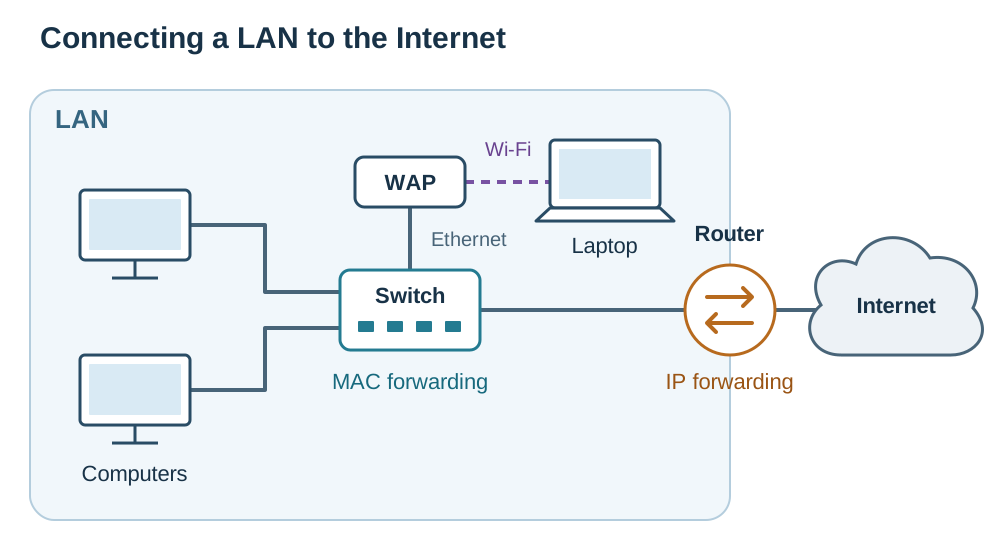
To tell the core hardware apart quickly:
- Repeater: copies and amplifies the physical signal.
- Switch: uses MAC addresses inside one LAN to forward frames.
- Router: uses IP addresses between networks to route packets.
- Gateway: translates between different protocols.
- Modem: converts the provider's signal into digital binary.
- Firewall: filters packets according to security rules.
MAC Addresses vs IP Addresses
Exam questions often require you to distinguish between physical and logical addresses:
- A MAC address (Media Access Control address) is a unique, permanent 48-bit hardware identifier burned into the NIC by the manufacturer (for example,
3C:5A:B4:1F:0D:9E). It operates inside a local network at the Data Link layer to identify the physical device. - An IP address (Internet Protocol address) is a logical identifier assigned by network software or an Internet Service Provider (for example,
193.1.24.8). It operates across networks at the Internet layer to define where a device is currently located on the global network.
A MAC address says which physical device you are, while an IP address says where on the network you currently are. A switch uses MAC addresses to pass frames inside a LAN; a router uses IP addresses to move packets across a WAN.
Protocols and the TCP/IP Protocol Suite
A communication protocol is a formal set of agreed rules that dictate how digital devices format, transmit, verify, and receive data. Without protocols, hardware from different vendors and running different operating systems could not communicate.
The Internet operates on the practical four-layer TCP/IP protocol suite:
| TCP/IP Layer | Core Protocols | Function |
|---|---|---|
| 4. Application | HTTP, HTTPS, VoIP, DNS | Interacts with end-user applications to generate and format requests and data payloads. |
| 3. Transport | TCP | Slices data into packets, manages sequence numbers, tracks delivery, and reassembles received data. |
| 2. Internet (Network) | IP | Provides logical addressing (IP addresses) and routes individual packets across intermediate networks. |
| 1. Data Link (Link) | Ethernet, Wi-Fi | Transmits raw binary frames across physical copper cables, fibre-optic lines, or radio channels. |
Encapsulation and De-encapsulation
As data travels down the sender's protocol stack, each layer wraps the payload in its own header containing necessary control data. This process is called encapsulation:
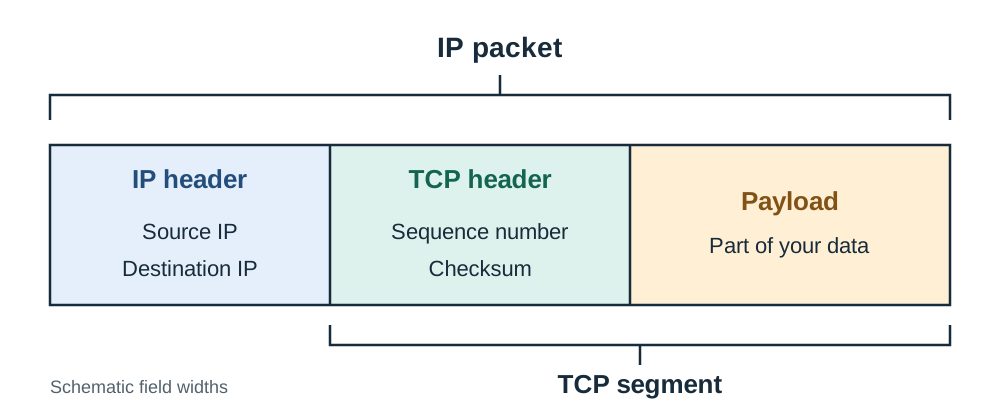
- At the Application layer, the user creates a message payload.
- At the Transport layer, TCP slices large messages into segments, adding a header with a sequence number and an error-checking checksum.
- At the Internet layer, IP adds an outer header containing the source IP address and destination IP address, forming a packet.
- At the Data Link layer, hardware adds local MAC addresses to create a frame for physical transmission.
At the receiving computer the process is reversed, which is called de-encapsulation. Each layer inspects its own header, verifies integrity, strips the header away, and passes the remaining payload upward.
Theoretical Context: The OSI Model
The OSI model is a seven-layer theoretical model: Physical, Data Link, Network, Transport, Session, Presentation, Application. The four TCP/IP layers map directly onto it. If an exam question asks you to name a network layer and explain its role, naming a TCP/IP layer such as the Transport layer and describing sequencing, acknowledgements, and reassembly provides a complete answer.
Packet Switching and TCP/IP Reliability
Packet Switching vs Circuit Switching
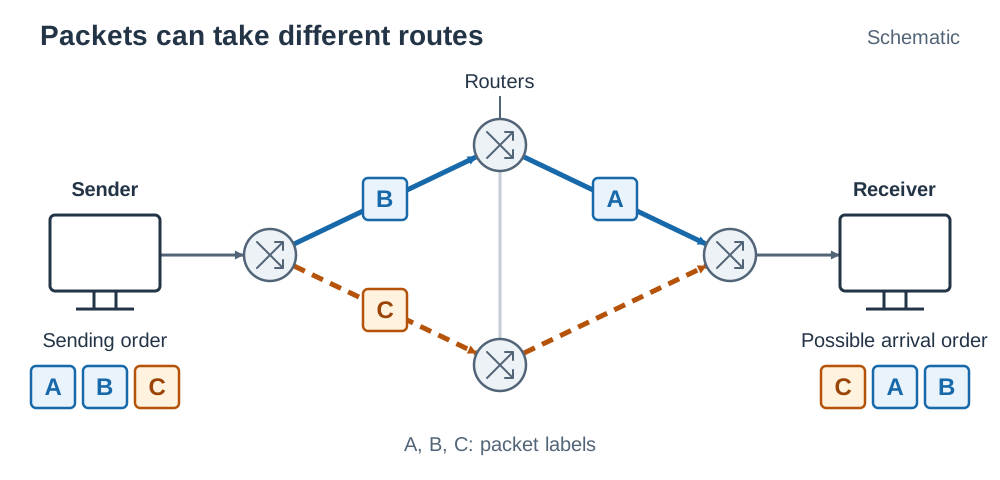
Data is not sent across the Internet as an unbroken stream. The Internet relies on packet switching: messages are divided into small, self-contained packets, each routed independently across available paths and reassembled at the destination.
Packet switching is used because it provides:
- Efficiency: multiple devices share transmission lines simultaneously without tying up dedicated links.
- Resilience: if an intermediate cable or router fails, subsequent packets are automatically forwarded along an alternative route.
Because packets can travel along different paths, they may arrive out of order, delayed, or lost. This design is why TCP is needed on top of IP.
In contrast, traditional telephone networks used circuit switching, which reserves a dedicated physical electrical circuit between caller and receiver for the entire duration of the call. Circuit switching guarantees fixed transmission timing but wastes line capacity when nobody is speaking.
Internet Protocol (IP) and Addressing
IP handles logical addressing and routing. IP is a connectionless, best-effort protocol. Routers inspect each packet's destination IP address and forward it towards that destination. IP does not guarantee that packets will arrive in order or arrive at all.
An IPv4 address (such as 193.1.24.8) consists of 4 bytes, with each byte containing 8 bits (values from 0 to 255):
A 32-bit address space supports unique addresses. The same base-conversion skill appears in web work when colours are written as hexadecimal codes, e.g. #0A33F0 gives R = 0A = 10, G = 33 = 51, B = F0 = 240. Because global demand exceeds 4.3 billion addresses, modern networks are migrating to IPv6, which provides 128-bit addresses.
Transmission Control Protocol (TCP)
TCP operates above IP at the transport layer to provide reliable, ordered data delivery:
- Connection setup: TCP establishes a connection between client and server before sending data.
- Slicing and sequencing: TCP breaks application data into segments and attaches a unique sequence number to each packet.
- Acknowledgements: The receiving computer sends an acknowledgement (ACK) back for every packet received correctly.
- Retransmission: If the sender does not receive an ACK within a specified timeout period, it retransmits the missing packet.
- Reassembly: The receiver uses sequence numbers to put packets back into their original order and strips the transport headers.
Application Protocols: HTTP, HTTPS, and VoIP
HTTP and HTTPS
HTTP (Hypertext Transfer Protocol) is an application-layer request-response protocol used to transfer web pages. A client sends a request (such as GET to retrieve a file or POST to send form data), and the server answers with an HTTP response containing a three-digit status code:
200 OK: Request succeeded; the resource payload is returned.404 Not Found: The requested URL does not exist on the server.500 Internal Server Error: The server encountered an unexpected error.
HTTP transmits all data across the network in unencrypted plain text, usually over port 80. Anyone intercepting the traffic can read submitted credentials or personal data.
HTTPS (Hypertext Transfer Protocol Secure) encrypts web traffic using TLS/SSL (Transport Layer Security), operating over port 443 by default. Encryption protects confidentiality and integrity: an eavesdropper sees only unreadable ciphertext. HTTPS servers also provide a digital certificate authenticated by an official certificate authority, allowing the client browser to verify the identity of the website.
VoIP (Voice over Internet Protocol)
VoIP digitises analogue audio signals into data packets and transmits them over IP networks. Spoken audio is captured by a microphone, sampled into digital values, compressed, split into packets, and transmitted. The receiving device reassembles the audio stream and converts it back into sound.
Because live speech happens in real time, VoIP call quality depends heavily on network performance:
- Bandwidth: The transmission capacity of a network link, measured in bits per second (bps).
- Latency: The time delay for a packet to travel from sender to receiver. High latency produces conversational delay.
- Jitter: The variation in packet arrival delay. High jitter causes speech to sound stuttered or uneven.
- Packet loss: Packets dropped due to network congestion, resulting in cut-out words or audio artifacts.
VoIP usually sends its audio using a fast, connectionless transport rather than TCP, precisely so that a late packet is dropped instead of being retransmitted. In live speech, waiting for a retransmitted packet disrupts the conversation far more than simply dropping a few milliseconds of audio.
Cloud Computing and Emerging Trends
Cloud computing is the delivery of on-demand computing services—such as servers, storage, databases, and software—over the Internet under a subscription model.
- Advantages: low set-up cost, because the school or business does not have to buy and house its own servers; high scalability to add storage or processing capacity when demand spikes; automatic off-site backups for disaster recovery; and simple collaboration across remote teams.
- Disadvantages: dependence on a reliable broadband connection — if the connection drops, the service is unavailable; recurring subscription fees; higher latency than accessing a local hard drive; and security and data protection concerns regarding data stored on third-party servers.
Internet Milestones and Emerging Trends
Key developments over the last century include:
- 1969: ARPANET launched the first working computer-to-computer packet-switching network.
- 1983: ARPANET adopted the TCP/IP protocol suite, establishing the technical core of the modern Internet.
- 1989–1991: Tim Berners-Lee invented the World Wide Web at CERN, defining HTML, HTTP, and URLs.
Several emerging trends continue to shape modern networks:
- Internet of Things (IoT): Everyday devices such as home sensors, smart electricity meters, appliances, and vehicles are assigned IP addresses to exchange data and allow remote management, accelerating the adoption of IPv6.
- 5G and high-speed mobile networks: High mobile bandwidth and ultra-low latency make responsive video calls, VoIP, and remote equipment control practical without wired connections.
- Edge computing: Processing data on or near the local device collecting it, rather than forwarding every reading to a distant central data centre, reducing latency and network congestion.
- Cloud-hosted AI services: Complex machine learning models are hosted in cloud data centres and accessed over networks via APIs, increasing global reliance on Internet infrastructure and energy-intensive data centres.
Key terms
- The Internet
- The global physical and logical infrastructure of interconnected computer networks communicating via standardised protocol suites such as TCP/IP.
- World Wide Web (WWW)
- An application-layer service of interlinked multimedia documents and websites hosted on servers and accessed over the Internet via hyperlinks and web browsers.
- Communication Protocol
- A formal set of agreed rules specifying how data is formatted, transmitted, routed, and received across a network.
- Client-Server Model
- A network architecture where client devices send requests for resources, and dedicated servers process and return responses.
- Peer-to-Peer (P2P)
- A decentralised network model where every connected computer acts as both client and server, sharing files and resources directly without a central server.
- Packet Switching
- A transmission method where messages are split into addressed packets that travel independently across shared network links and are reassembled at the destination.
- MAC Address
- A permanent 48-bit hardware address burned into a network interface card by the manufacturer to identify a physical device within a local network.
- IP Address
- A logical numerical address assigned to a device on a network, used by routers to direct packets to the correct destination.
- Encapsulation
- The process where each descending layer in a protocol stack wraps data within its own header containing addressing and control information.
- De-encapsulation
- The process at a receiving device where each ascending protocol layer inspects, processes, and strips off its corresponding header.
- HTTP
- Hypertext Transfer Protocol; an application-layer request-response protocol used to transmit unencrypted web pages, defaulting to port 80.
- HTTPS
- Hypertext Transfer Protocol Secure; an encrypted version of HTTP that uses TLS/SSL over port 443 to safeguard data confidentiality and verify server identity.
- TCP
- Transmission Control Protocol; a transport-layer protocol providing reliable, connection-oriented delivery using packet sequencing, acknowledgements, and retransmissions.
- IP
- Internet Protocol; a connectionless network-layer protocol responsible for packet addressing and routing across network boundaries.
- VoIP
- Voice over Internet Protocol; an application protocol that digitises analogue audio into packets for transmission across IP networks.
- Router
- A networking device that inspects Layer 3 packet IP addresses to forward data between distinct computer networks.
- Switch
- A networking device that inspects Layer 2 frame MAC addresses to direct traffic to specific ports within a single local area network.
- Firewall
- A hardware or software security system that inspects network traffic entering and leaving a network and blocks packets that violate security rules.
- Latency
- The time delay taken for a data packet to travel from its source to its destination across a network.
- Jitter
- The variation or inconsistency in packet arrival times across a network link.
Check yourself
A school wants to connect 24 classroom PCs to each other and connect the school network to an Internet provider. Name the two main hardware devices needed and state the role of each.
A switch, which connects the 24 PCs on the local area network (LAN) and forwards frames using MAC addresses; and a router, which forwards packets between the school LAN and the wider Internet using IP addresses.
What is the core difference between a MAC address and an IP address?
A MAC address is a permanent 48-bit hardware address assigned to a network card by its manufacturer to identify a device on a LAN, while an IP address is a logical address assigned by the network to identify the device's location on the Internet.
Why does the Internet use packet switching instead of circuit switching?
Packet switching allows multiple communications to share the same physical cables simultaneously (improving efficiency) and allows packets to be dynamically rerouted if an intermediate link fails (improving resilience).
Which protocol encrypts web traffic, and what default port does it use?
HTTPS encrypts web traffic using TLS/SSL and operates over port 443 by default (compared to unencrypted HTTP on port 80).
Why is packet retransmission avoided during live VoIP voice calls?
Live speech requires continuous, real-time playback. If a dropped audio packet is retransmitted, it will arrive half a second late, which is unusable for live audio and would disrupt the conversation.
In a database-backed web application (ALT 1), why does the client browser not query the database directly?
The browser sends an HTTP request to a server-side web application, which validates the input, safely executes queries against the database, formats the result, and returns an HTTP response, maintaining security and data integrity.